🎉 Founders Program — Solo free for 6 months
Built for Ethiopian Construction Professionals

ለኢትዮጵያ ግንባታ ባለሙያዎች የተሰራ — Amharic support coming soon, see FAQ

Stop Losing Bids
to Guesswork. Professional cost estimation, finally.

Import your BOQ, match it against your rates, generate unit-rate analyses, and get a costed CPM schedule — in hours, not days.

No email required for the sample project — opens in Conio if it's already installed.

Windows 10 / 11 + Docker Desktop · Just an email — no password, no card · Your data never leaves your machine · Free tier is free forever
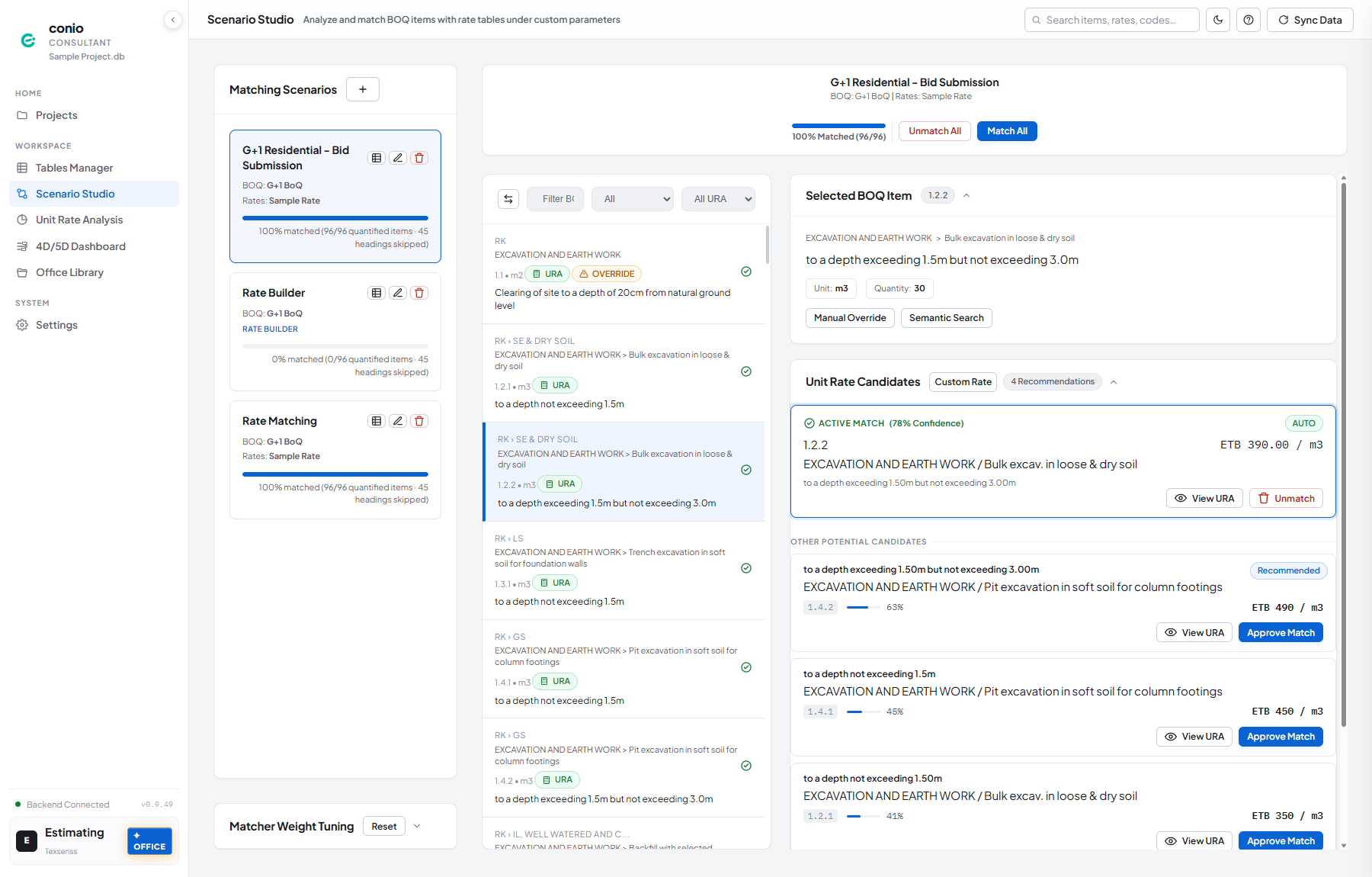
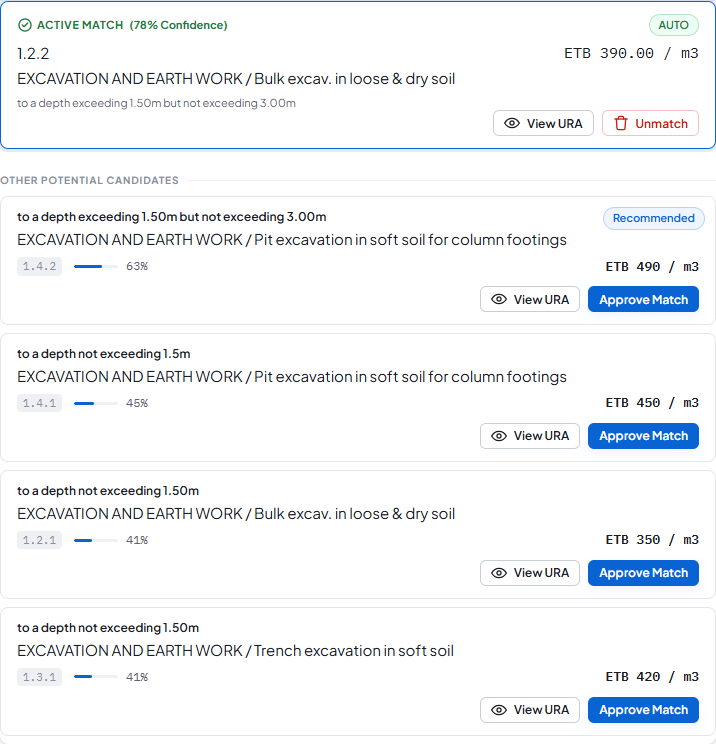
Conio Scenario Studio: a BOQ item auto-matched to a unit rate at 78% confidence, with ranked alternative candidates
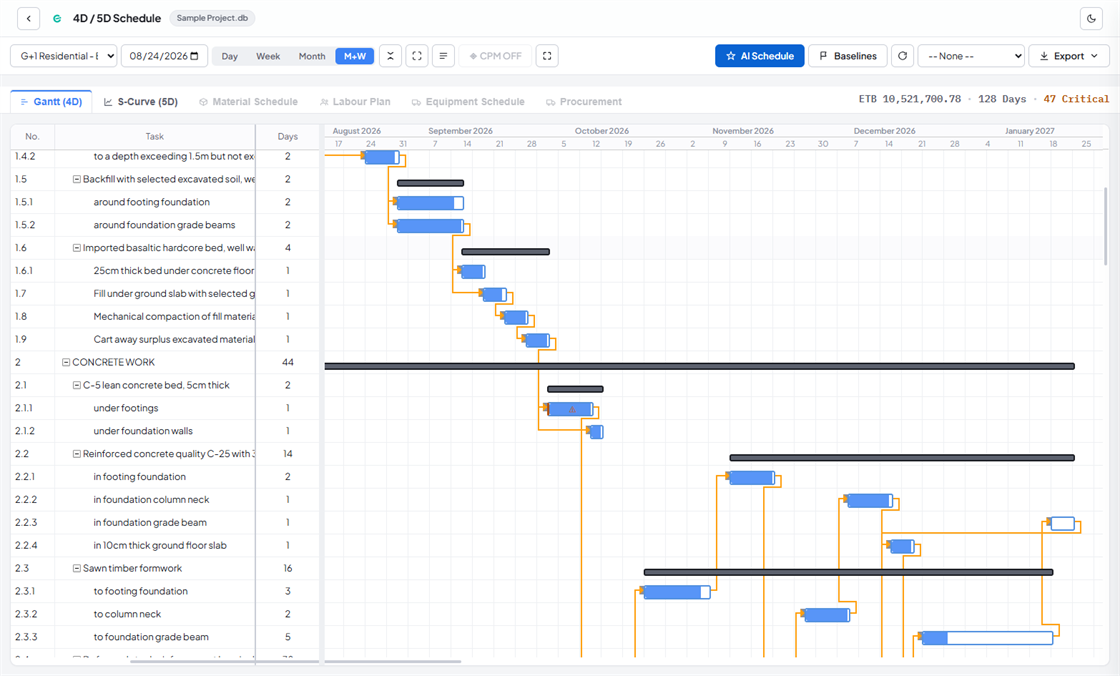
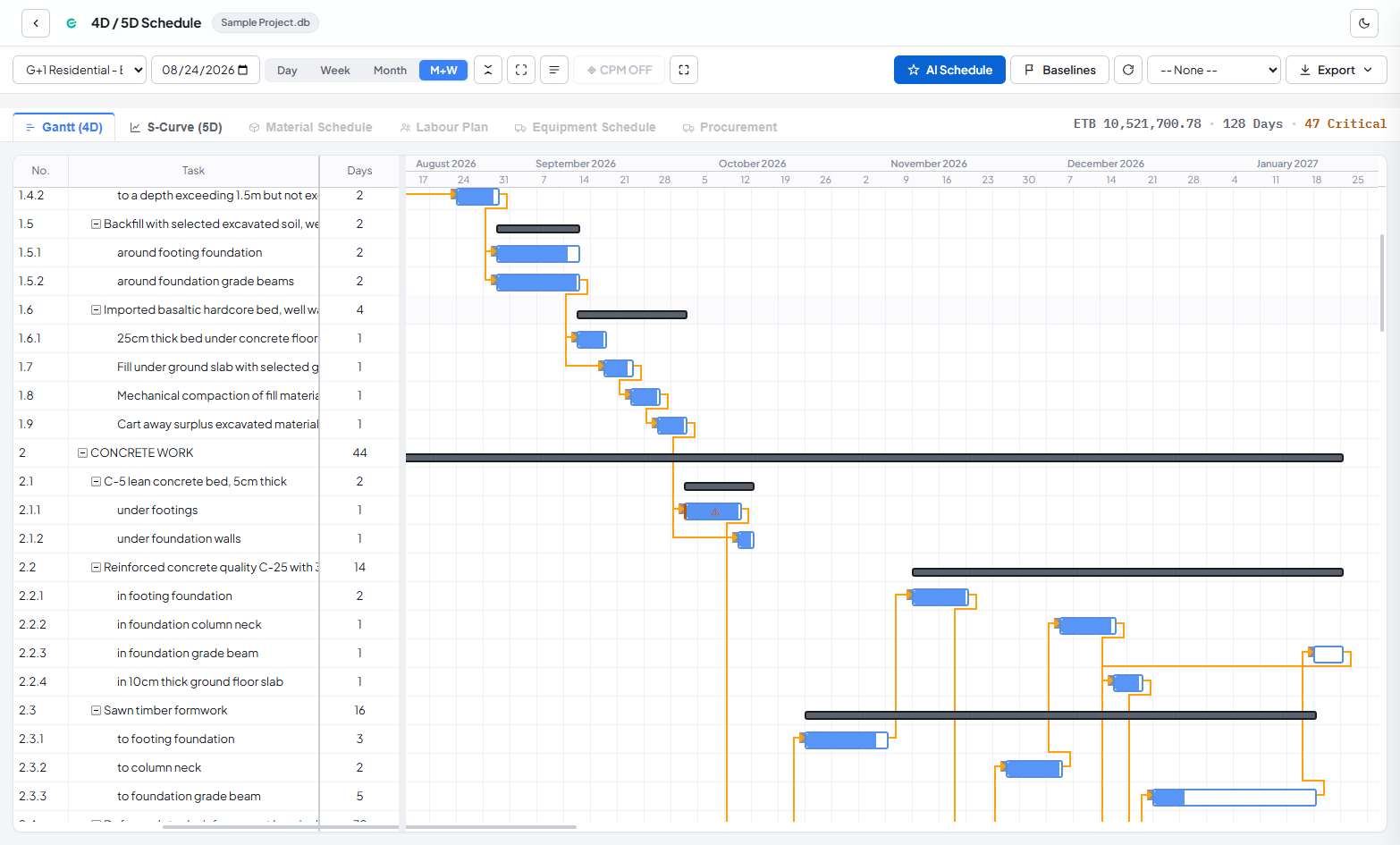
Conio 4D/5D schedule: a Gantt chart with dependency links and the critical path
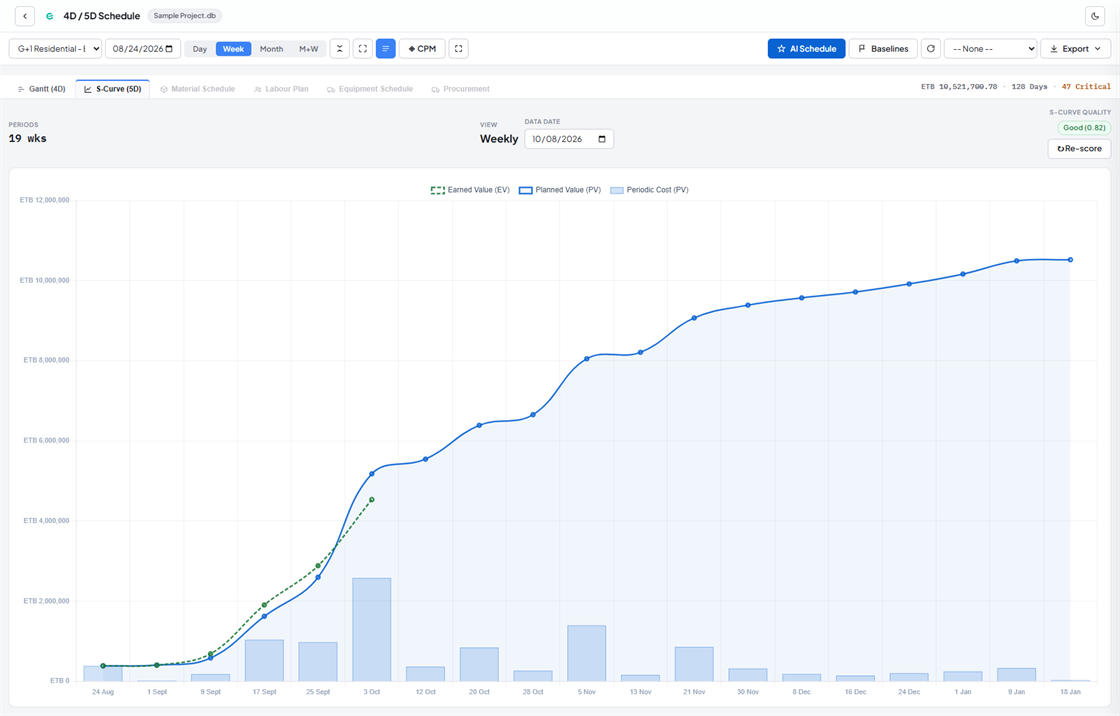
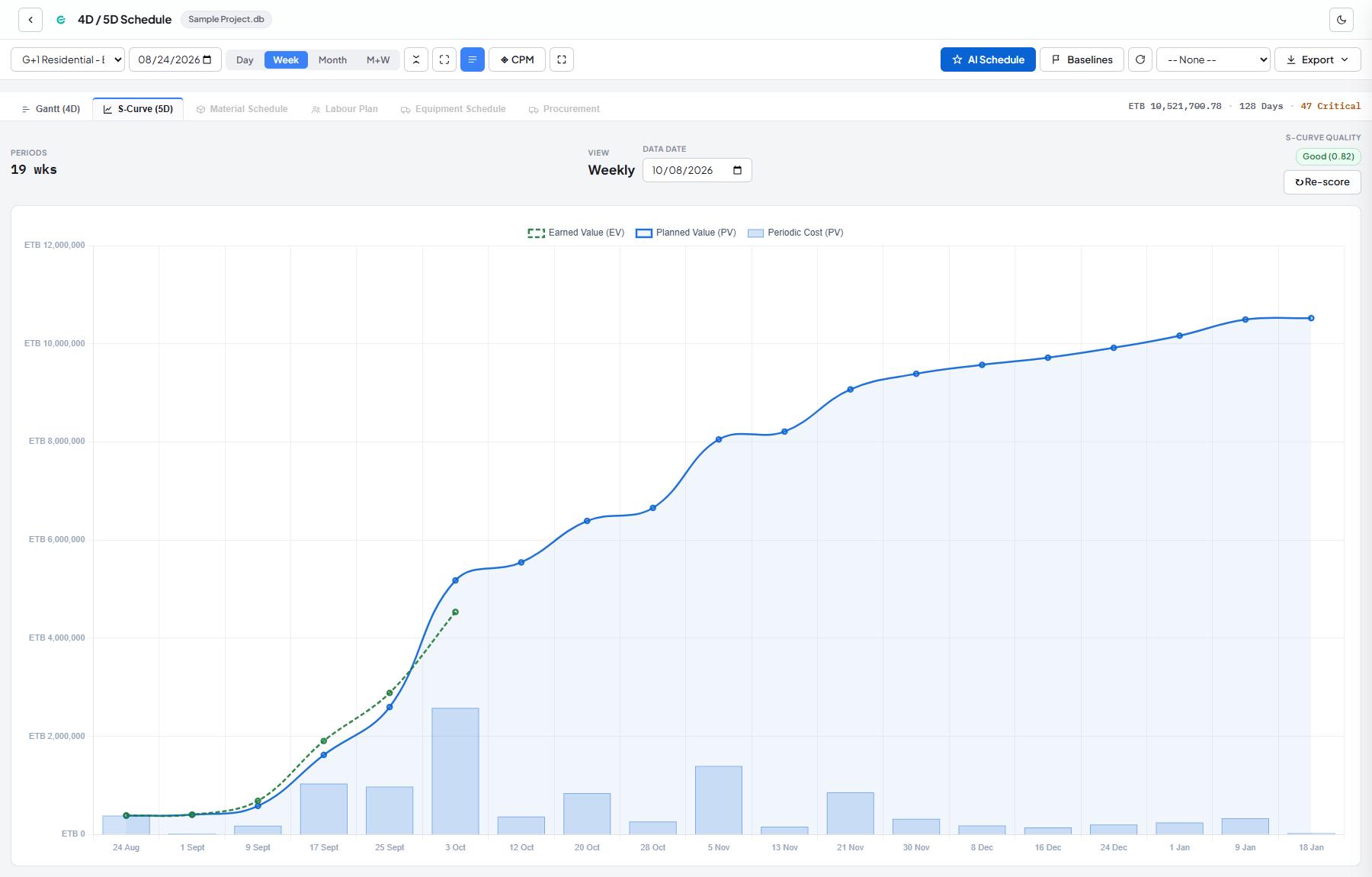
Conio cash-flow S-curve showing planned value, earned value and periodic cost
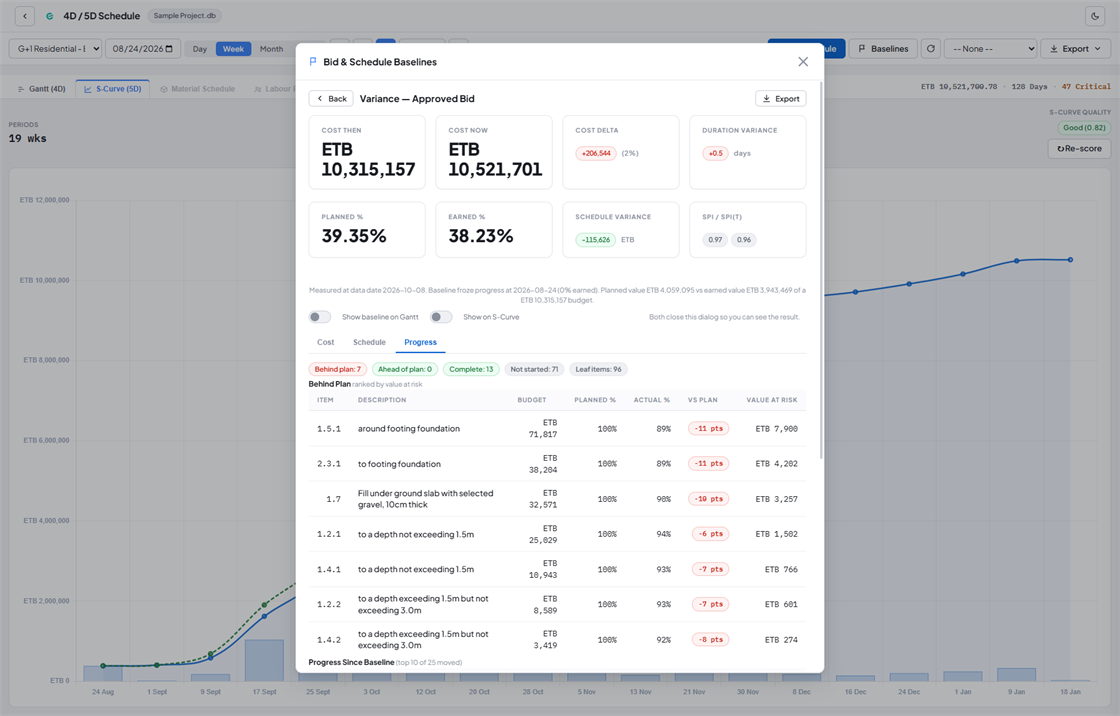
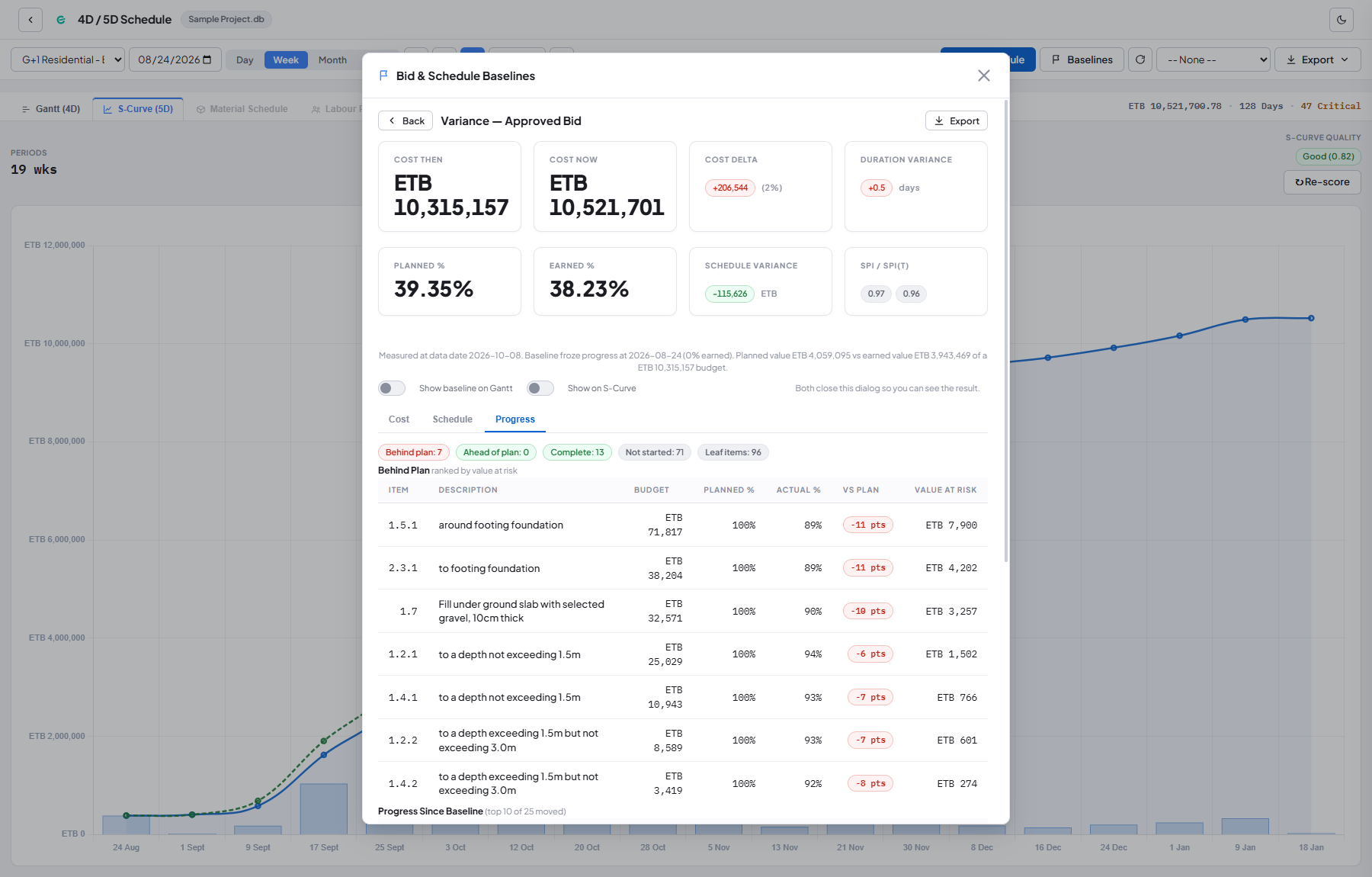
Conio baseline progress variance: items behind plan ranked by value at risk
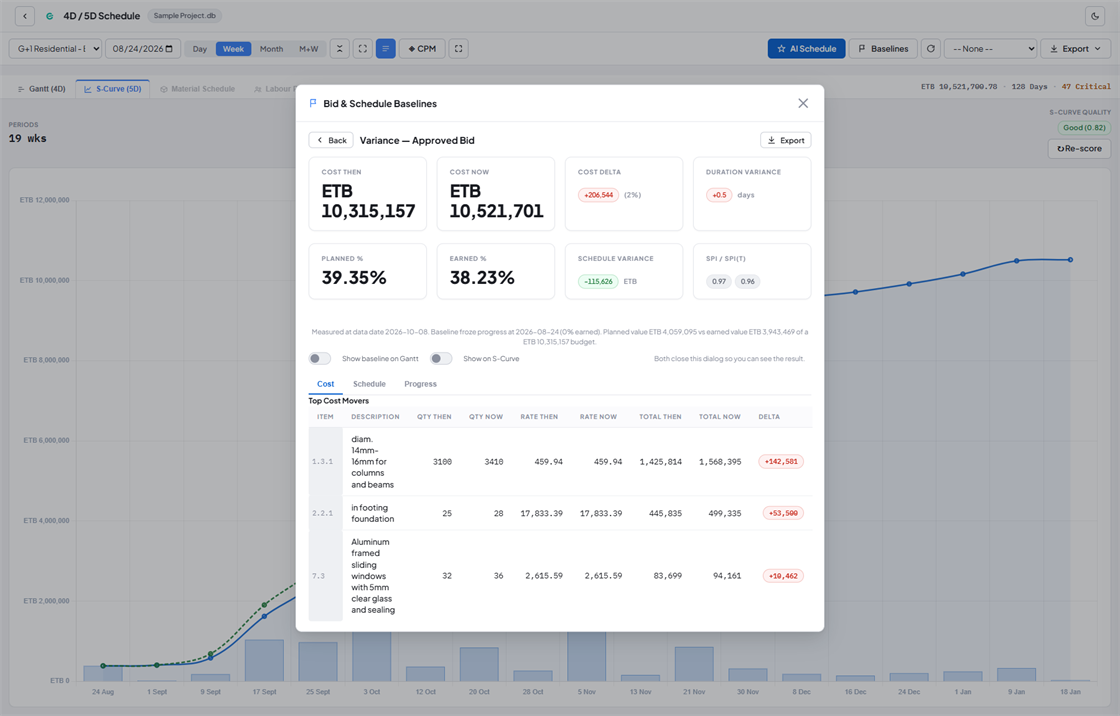
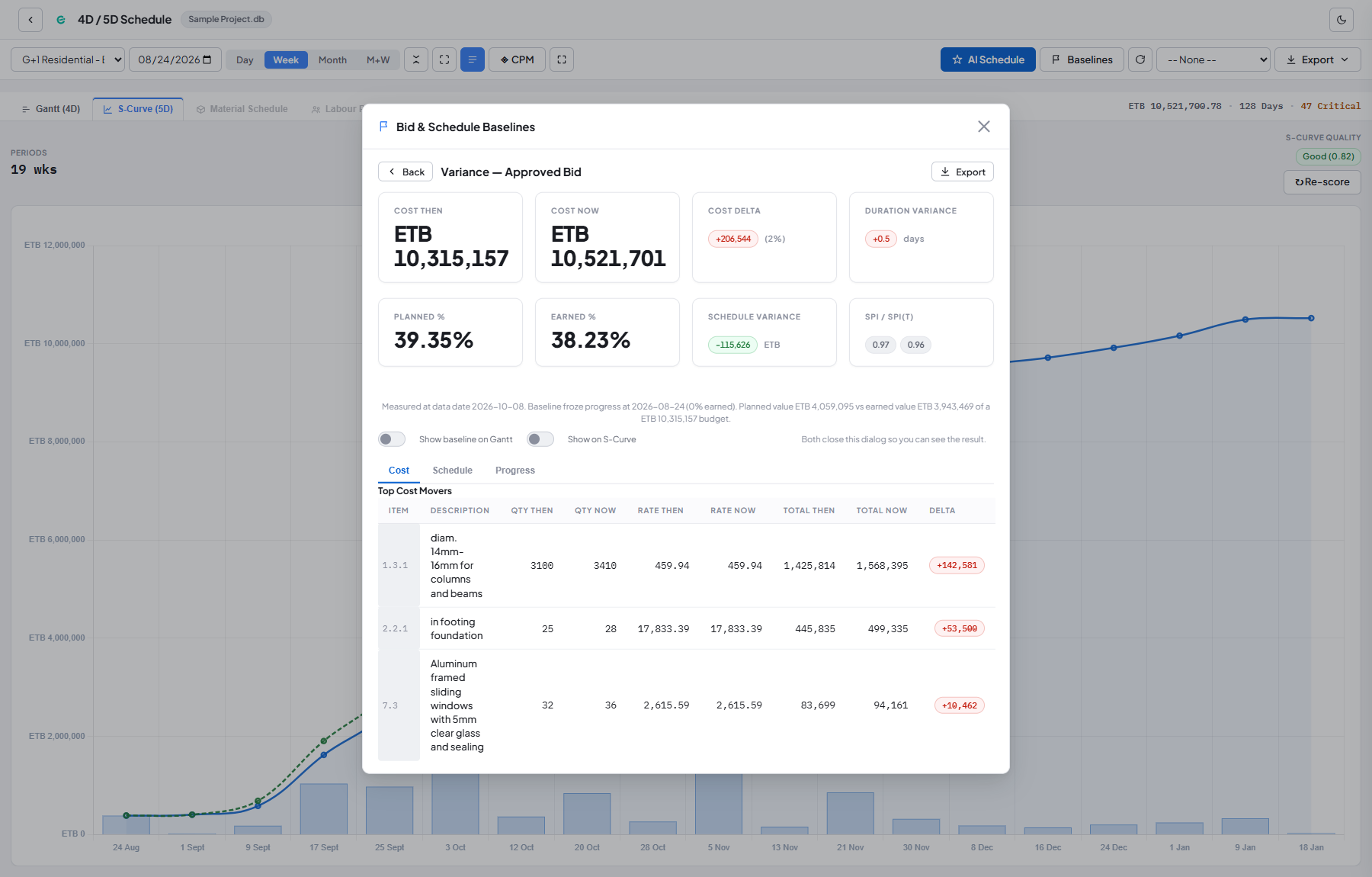
Conio baseline cost variance: top cost movers between the approved bid and current estimate
Scroll
The Pipeline

From BOQ to Bid

Four steps, one dataset — no re-keying between spreadsheets, rate books, and the programme.

STEP 01
Import
Excel or Google Sheets: BOQ, rate tables, resource price books.
STEP 02
Match
AI pairs every BOQ line with your rate items; you review and approve.
STEP 03
Price
AI builds material/labor/equipment breakdowns from your price book.
STEP 04
Schedule
One click to a costed CPM programme with cash-flow S-curve, exported to MS Project or Excel.
Product Tour

Six Screens From the Real App

No staged data — this is what's on screen once you're matching, pricing, and scheduling.

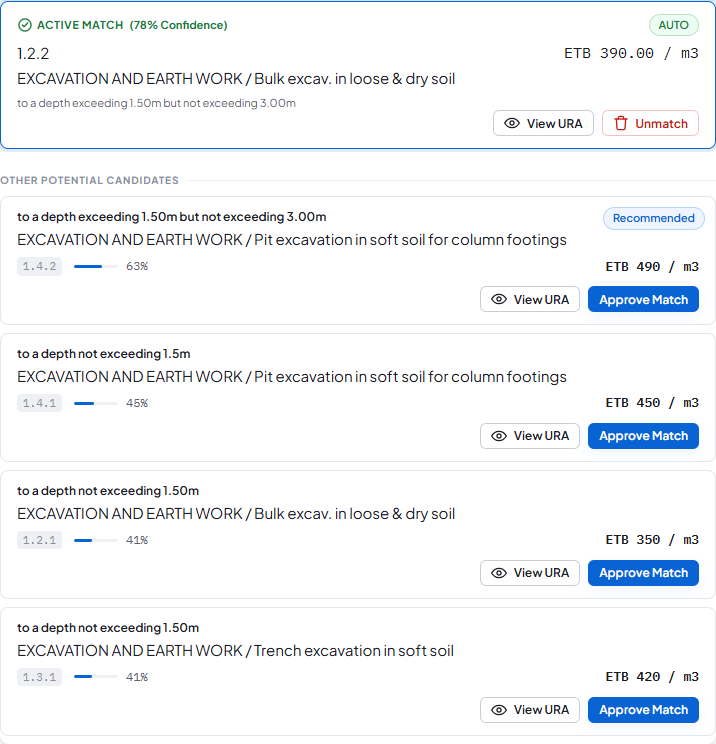
Conio Scenario Studio, full view: a BOQ item's matched rate, confidence score, and ranked alternative candidates Ranked candidate rates for a single BOQ line, with confidence scores and source breakdown Conio CPM schedule: a Gantt chart with dependency links and the critical path highlighted Conio cash-flow S-curve showing planned value, earned value, and periodic cost Conio baseline progress variance: items behind plan, ranked by value at risk Conio baseline cost variance: the biggest cost movers between the approved bid and the current estimate
01

Scenario Studio

The full view behind a single BOQ item: the matched rate, its confidence score, and the ranked alternatives it was chosen over.

02

Match Candidates

Candidate rates for a BOQ line, ranked with confidence scores and a breakdown of where each one came from.

03

Schedule — Gantt

The CPM schedule built from the priced BOQ: dependency links and the critical path, laid out as a Gantt chart.

04

Schedule — S-Curve

The same schedule as a cash-flow S-curve: planned value, earned value, and periodic cost over the programme.

05

Baseline Progress OFFICE

Against an approved baseline: items running behind plan, ranked by how much value is at risk.

06

Baseline Variance OFFICE

The biggest cost movers between the bid you approved and where the estimate stands now.

Features & Benefits

Built on your data,
not a shipped database

Everything below works in the product today. Conio drafts — you review and approve every match, rate, and sequence.

Match a 500-Item BOQ Before Lunch

Every BOQ line is matched to the right rate in your price book, with the alternatives ranked beside it. You review and approve — days of manual lookup become a quick check.

Defensible Rates, Not Guesses

A full materials, labour and equipment breakdown, built from your own price book — for one item or a whole BOQ. Every rate stays open, editable, and reusable on the next bid.

Your Second Bid Is Faster Than Your First

Every bid you finish becomes a starting point for the next one. Work you've already priced comes back at today's rates instead of being rebuilt. The more you use it, the faster each new bid gets.

A Bid Programme in One Click

Turns your priced BOQ into a full project schedule — an interactive timeline, local-holiday calendars, progress tracking, and a cash-flow forecast — ready to refine, not drawn from scratch.

Fits the Submission You Already Have

Export your schedule and pricing straight into Microsoft Project, Excel, or Power BI — plus BOQ exports formatted exactly the way tender submissions expect, so nothing needs reformatting by hand.

Your Files Never Leave Your Machine

Everything runs on your own computer — your projects are never uploaded anywhere, and Conio keeps working through internet outages. Prefer a cloud AI service? Connect your own account, and only the text you send it ever leaves your machine.

Example scenario, not a customer result
A 400-item BOQ: ~4 days of manual matching and rate build-up → under a day with review.
Pricing

Free forever. Solo when you need it.

Prices are public from day one — the free period below is a promotion, not the price.

Free
0 ETB · forever

Getting started; students.

  • Import BOQ & rate tables, unlimited projects
  • Automatic BOQ-to-rate matching
  • Unit rate analysis from your own price book
  • Built-in offline AI assistant — no API key, up to 100 items
  • Full schedule, Gantt & cash-flow S-curve
  • MS Project / Excel / Power BI export
Solo
3,500 ETB/mo
billed annually · fixed at $20/mo USD

Individual QS / freelance estimator.

  • Everything in Free, plus:
  • AI resolves the tricky matches for you
  • AI unit rates for a whole BOQ in one pass
  • AI drafts the schedule task order
  • Works with the AI service you already use
  • 2 device activations
Pricing details & terms

Prices shown in ETB for easy budgeting. Your contracted price is fixed in USD (shown under each tier). Invoices are issued in ETB at the prevailing rate on the invoice date, payable by bank transfer or other methods.

Solo licenses are for individual use. Use within a firm's bid workflow requires an Office license — see license terms.

Solo licenses activate on up to 2 devices, Office on up to 5 — need more? Contact us.

Solo's AI tools work on projects up to 300 items; Office has no project-size or AI-item caps.

Founders Program — Limited Period

Solo. Free for 6 months.

Every new Solo signup gets full access at no cost for six months, then 50% off their first paid year. Prices on this page are the standard list prices — this is the promotion, not a different price.

No card required — Solo is activated by a license token we email you.

Office pricing and trial terms are agreed directly with our team.

Common Questions

FAQ

Why not just use Excel?

Excel holds the numbers; Conio holds the logic — matching, rate build-up, and programme come from one dataset, so a BOQ revision doesn't mean starting over.

Why not a generic or free construction ERP?

Built for local bid practice — BOQ formats, URA breakdown conventions, ETB, local working calendars — not adapted from foreign workflows.

Why not a cloud estimating tool?

Your bid data stays on your machine. No uploads, no accounts, works through internet outages.

Do I need my own AI API key?

Not on Free — its built-in AI runs on your own computer, no key needed, and nothing leaves your machine. Solo and Office connect to your own AI account (Gemini, Claude or GLM) or a self-hosted model, so you control the AI cost and where your data goes.

What happens when my license expires?

Conio downgrades gracefully to Free — every project, rate, schedule, and export you've already made stays yours and stays usable.

Is there an Amharic version?

Coming soon — Amharic support is planned for the download form and setup guide first, with fuller site translation to follow.

Have more questions? Ask us below and we will include it here.

Question Sent
Thanks — we've noted your question and may add it to the FAQ above.
Actively Maintained

What's New

Recent updates

Conio ships improvements continuously.

Free Data

Published Rates, Ready to Match

Public price releases, prepared as Conio projects. Download, open with Conio, and match it against your own BOQ — no import step, no account, no email. Don't have Conio yet? Get it free.

Get Started

Download Conio or Request a License

Tell us who you are and what you need — verify by email or Telegram, whichever's faster for you.

What you'll need የሚያስፈልግዎት

Windows 10/11, and Docker Desktop (one-time install — see the install guide). First-time setup takes about 10 minutes. Stuck partway through? Email us and we'll walk you through it.

Windows 10/11 እና Docker Desktop ያስፈልጋል (አንድ ጊዜ ብቻ የሚጫን)። ማዋቀሩ ወደ 10 ደቂቃ ይወስዳል። ቢቸገሩ በኢሜይል ያግኙን።

ቀጥል

No spam. Just what you asked for.
Check Your Inbox
We've sent a verification link by email. Confirm it and we'll take it from there.

Already have Conio installed? Download the demo project directly — no email required.